
TAMRON Lens Utility Ver. 5.0: Exciting New Features
TAMRON announces TAMRON Lens Utility Ver. 5.0, a major software update designed to give photographers and video creators greater control over compatible TAMRON lenses. Released on February 19, 2026, the update introduces new focus and aperture controls, Focus Timelapse, enhanced Astro Focus Lock, Night Mode and other improvements for both the mobile and PC versions.
The update advances TAMRON Lens Utility from Ver. 4.0 to Ver. 5.0, expanding the software’s capabilities for still photography, video production, astrophotography and other creative shooting applications.
TAMRON Lens Utility Ver. 5.0 is available for compatible iOS, Android, Windows and macOS devices, although available functions vary depending on the connected lens and mount.
What Is TAMRON Lens Utility Ver. 5.0?
TAMRON Lens Utility Ver. 5.0 is the latest major version of TAMRON’s dedicated lens-control software.
The software allows photographers and video creators to customize supported lens functions and control certain lens operations from a compatible computer or mobile device.
With Ver. 5.0, TAMRON expands these capabilities with new tools designed around focus control, aperture control, time-lapse photography, astrophotography and low-light operation.
The update is available in both mobile and PC versions, with compatibility depending on the operating system, lens and connection method.
New Features in TAMRON Lens Utility Ver. 5.0
TAMRON Lens Utility Ver. 5.0 introduces several new functions that give photographers more precise control over compatible lenses.
The major additions include:
- Focus/Iris Marker Link
- Ring Stopper
- Selectable focus and aperture rotation angles
- Focus Time Lapse
- Astro Focus Lock Fine Adjustment
- Night Mode
Together, these features make the software more useful for photographers and video creators who want greater control over manual focus, aperture operation and specialized shooting techniques.
Focus and Iris Marker Link
One of the key additions in Ver. 5.0 is Focus/Iris Marker Link.
Previously, markers could be set on the focus ring. With the new feature, markers can also be set on the aperture ring.
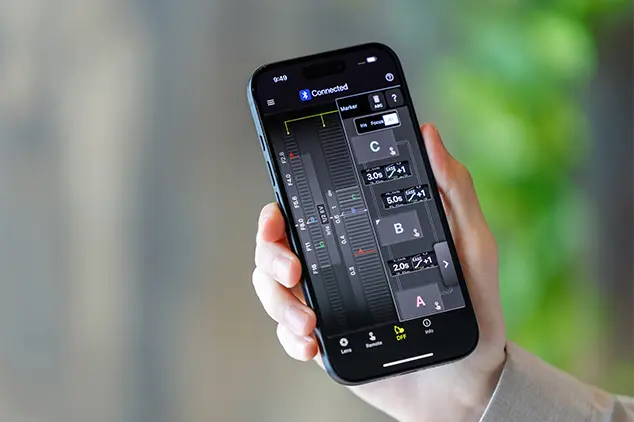
When using the Digital Follow Focus (DFF) screen, photographers and video creators can move the focus or aperture setting to a preset marker with a single tap.
This can be particularly useful for video production.
For example, a creator can establish specific focus positions before recording and then move between those positions during a shot. Preset markers can make repeated focus adjustments more consistent and easier to control.
Ring Stopper for Precise Operation
Ring Stopper is another new function introduced with TAMRON Lens Utility Ver. 5.0.
The feature allows users to set an electronically controlled stopper for the focus and aperture rings. This helps prevent unintended over- or under-adjustment while operating the lens.
When using the DFF screen, both rings can also be manually controlled at the same time.
This provides a more controlled operating experience for video creators and photographers who need precise manual adjustments.
Select the Focus and Aperture Rotation Angle
Ver. 5.0 also allows users to select the rotation angle of the focus and aperture rings.
This gives photographers more flexibility when setting up manual controls.
The rotation angle can be selected according to the shooting situation, allowing the operation of the lens to better match the photographer’s creative intentions.
For video creators, this can help create a more predictable focus or aperture adjustment workflow.
Focus Time Lapse
Another major feature is Focus Time Lapse.
This function works together with a camera’s interval-shooting capability. It allows the focus position to gradually shift during a time-lapse sequence.
Instead of keeping focus fixed throughout the sequence, photographers can program a gradual focus change to create a transition between different focus positions.
This can open up creative possibilities for:
- Product photography
- Landscape scenes
- Nature subjects
- Creative video
- Focus-transition sequences
- Time-lapse productions
The feature gives photographers another way to incorporate controlled focus movement into their work.
Astro Focus Lock Fine Adjustment
TAMRON Lens Utility Ver. 5.0 also improves Astro Focus Lock (Astro FC-L) with a new fine-adjustment function.
Astrophotography often requires extremely precise focus. Even small changes in focus can affect the appearance of stars and other distant celestial objects.
The new fine-adjustment function allows photographers to fine-tune and save focus positions according to their shooting environment and creative intentions.
This can simplify the process of establishing a reliable focus position when photographing the night sky.
Night Mode for Low-Light Shooting
Ver. 5.0 introduces Night Mode, designed for use in dark environments.
When Night Mode is activated, the application interface turns red and becomes dimmer. This helps reduce eye strain in low-light conditions while also minimizing the disturbance caused to other photographers working nearby.
This can be particularly useful for astrophotography and other nighttime shooting situations where a bright smartphone or computer display can be distracting.
Better Tools for Video Creators
The new functions in TAMRON Lens Utility Ver. 5.0 make the software particularly useful for video production.
Features such as Focus/Iris Marker Link, Ring Stopper and selectable rotation angles provide greater control over lens operation.
The DFF screen can also be used to control supported focus and aperture functions.
These tools can help video creators establish repeatable adjustments and reduce accidental movements during recording.
For productions that rely on controlled focus changes, the ability to save and move between preset positions can make the shooting process more consistent.
New Possibilities for Astrophotography
Astrophotographers can also benefit from several of the new features.
Astro Focus Lock Fine Adjustment provides additional control when establishing focus for the night sky, while Night Mode reduces the brightness of the application interface.
Together, these functions are designed around the practical challenges of working in dark environments.
Precise focus is especially important when photographing stars, where even a small focus error can reduce the clarity of distant points of light.
TAMRON Lens Utility Mobile
TAMRON Lens Utility Ver. 5.0 is available for mobile devices as well as computers.
The mobile version supports iOS and Android, although the connection requirements differ between operating systems.
For iOS devices, TAMRON-LINK (Model TL-01) is required for supported wireless operation. Android devices can use TAMRON-LINK or the TAMRON Connection Cable USB Type-C to Type-C (Model CC-350), depending on the supported setup.
This means photographers can access supported lens-control functions from a smartphone while shooting in the field.
TAMRON Lens Utility for Windows and macOS
The PC version of TAMRON Lens Utility Ver. 5.0 supports Windows 11 64-bit and compatible versions of macOS.
For PC connections, users can connect compatible lenses using the TAMRON Connection Cable USB Type-A to Type-C (Model CC-150) or USB Type-C to Type-C (Model CC-350), depending on the computer and supported lens setup.
The PC version is also important for lens firmware updates.
Firmware Updates Still Require the PC Version
One important distinction is that TAMRON Lens Utility Mobile cannot update lens firmware.
When a compatible lens requires a firmware update, the PC version of TAMRON Lens Utility must be used.
Before using the software’s functions, TAMRON recommends ensuring that the firmware of the compatible lens is up to date.
Compatibility can vary between lenses and mounts, so users should check TAMRON’s current compatible-lens information before updating or connecting their equipment.
Current Software Version
Although the original announcement introduced Ver. 5.0 on February 19, 2026, TAMRON subsequently released Ver. 5.1.0 for iOS and Android on July 30, 2026. TAMRON describes Ver. 5.1.0 as a minor update containing fixes and display adjustments.
This means Ver. 5.0 remains the major feature release covered by this announcement, while users should check TAMRON’s support page for the latest available software version before downloading or updating the application.
Compatible Operating Systems
TAMRON’s Ver. 5.0 announcement lists the following operating-system compatibility:
| Version | Compatible Operating System |
|---|---|
| Mobile | iOS 16-18, 26 |
| Mobile | Android 6.0-16 |
| PC | Windows 11 64-bit |
| PC | macOS 13-15, 26 |
Actual functions depend on the connected lens, mount and operating environment.
TAMRON notes that operation is not guaranteed on every device.
Compatible Lenses and Firmware
Not every TAMRON lens supports every function in Lens Utility.
The available features depend on the specific lens and mount. TAMRON maintains a compatible-lens list that users should consult before connecting their equipment.
At the original Ver. 5.0 announcement, firmware supporting the update was scheduled for spring 2026 for the following lenses:
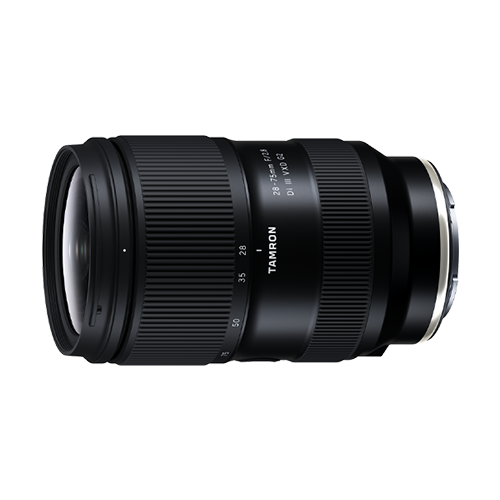
- 28-75mm F/2.8 Di III VXD G2 (Model A063) for Nikon Z mount
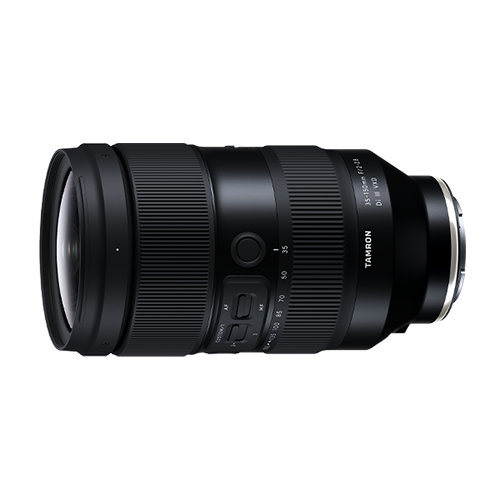
- 35-150mm F/2-2.8 Di III VXD (Model A058) for Sony E mount
TAMRON stated that until the required firmware became available, these lenses would retain the functions available through Ver. 4.0.
For the most current compatibility information, users should refer to TAMRON’s support resources.
What Can Photographers Do with Lens Utility?
The broader TAMRON Lens Utility ecosystem is designed to give photographers more control over compatible lenses.
Depending on the lens, users can access functions designed for:
- Manual focus control
- Focus preset operation
- Digital Follow Focus
- Focus markers
- Aperture control
- Focus adjustment
- Astrophotography
- Time-lapse photography
- Video production
- Lens firmware updates
The exact functions available vary according to the lens model and mount.
TAMRON Lens Utility Ver. 5.0 for Video
For video creators, the biggest benefit of Ver. 5.0 is increased control over focus and aperture.
The combination of Focus/Iris Marker Link, Ring Stopper, rotation-angle selection and Digital Follow Focus provides tools for more deliberate lens operation.
These features can be particularly valuable when shooting repeatable sequences, interviews, product videos or other productions where precise focus changes are important.
TAMRON Lens Utility Ver. 5.0 for Still Photography
Still photographers can also benefit from the update.
Focus Time Lapse opens creative possibilities for interval shooting, while Astro Focus Lock Fine Adjustment can simplify precise focusing during astrophotography.
For everyday photography, the software provides additional customization options for supported TAMRON lenses.
The value of the update ultimately depends on the specific lens, but Ver. 5.0 expands the range of creative tools available within the TAMRON Lens Utility system.
How to Get TAMRON Lens Utility
TAMRON Lens Utility can be downloaded through TAMRON’s official support resources.
The PC download page provides installation packages for supported Windows and macOS systems, while mobile users can access the application through the appropriate iOS or Android app store.
Before installing an update, users should check the operating-system requirements and compatible-lens information.
It is also recommended to ensure that the lens firmware is current before using the latest Lens Utility features.
TAMRON Lens Utility Software Update History
TAMRON Lens Utility has continued to evolve through multiple major updates.
| Version | Date | Key Changes |
|---|---|---|
| Ver. 2.0 | September 2023 | Improved Focus Preset and A-B Focus functions |
| Ver. 3.0 | May 2024 | Added Astro FC-L and Focus Stopper |
| Ver. 4.0 | September 2024 | Expanded TAMRON Lens Utility Mobile functions |
| Ver. 5.0 | February 2026 | Added Focus/Iris Marker Link, Ring Stopper, Focus Time Lapse, Astro FC-L Fine Adjustment and Night Mode |
| Ver. 5.1.0 | July 2026 | Minor fixes and display adjustments for iOS and Android |
TAMRON’s current support information confirms the July 2026 Ver. 5.1.0 release.
Why Update to TAMRON Lens Utility Ver. 5.0?
For users with compatible TAMRON lenses, Ver. 5.0 adds several practical tools that go beyond a simple maintenance update.
The most notable benefits include:
- More precise focus control
- Improved aperture control
- Focus Time Lapse
- Astro Focus Lock Fine Adjustment
- Night Mode
- Preset focus and aperture markers
- Electronically controlled ring stoppers
- Customizable focus and aperture rotation angles
- Mobile support for iOS and Android
- PC support for Windows and macOS
These additions give photographers and creators more options for customizing how they operate their compatible TAMRON lenses.
Conclusion
TAMRON Lens Utility Ver. 5.0 represents a significant expansion of TAMRON’s lens-control software, adding new functions for focus, aperture, video, time-lapse photography and astrophotography.
Features such as Focus/Iris Marker Link, Ring Stopper, Focus Time Lapse, Astro Focus Lock Fine Adjustment and Night Mode give compatible lenses new possibilities for precise and creative operation.
While the software’s available functions depend on the specific lens and mount, Ver. 5.0 provides photographers and video creators with a broader set of tools for customizing their shooting workflow.
For users of compatible TAMRON lenses, checking the latest software and firmware versions can help ensure access to the newest available functions and improvements.
To download the application for iOS, please visit the following page: https://apps.apple.com/app/id6746462774
For Android, please visit the following page: https://play.google.com/store/apps/details?id=jp.co.tamron.lensutility.mobile
For PC, please visit the following page for download and installation instructions: https://www.tamron.com/global/consumer/support/download/lensutility/
TAMRON products mentioned in this article