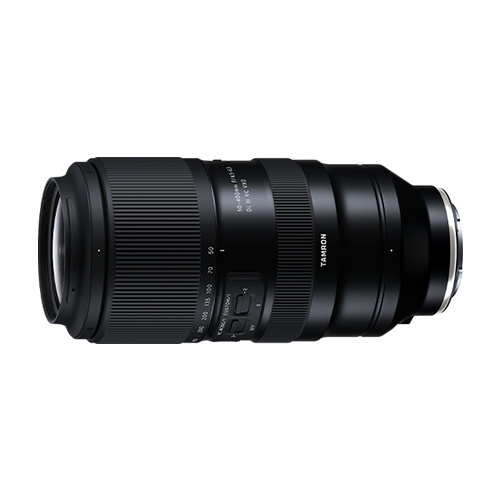

50-400mm A067 Firmware Ver. 5: New Lens Utility Support
The 50-400mm A067 firmware Ver. 5 is the latest firmware update for the TAMRON 50-400mm F/4.5-6.3 Di III VC VXD (Model A067) for Sony E-mount cameras. Released on February 19, 2026, the update adds compatibility with TAMRON Lens Utility Ver. 5.0 and TAMRON Lens Utility Mobile Ver. 5.0.
Keeping the lens firmware updated helps ensure compatibility with the latest TAMRON software and its supported features. Users of the Sony E-mount A067 should check their current firmware version and update to Ver. 5 when appropriate.
What is new in 50-400mm A067 firmware Ver. 5?
The latest firmware focuses on compatibility with the newest versions of TAMRON’s lens software.
The 50-400mm A067 firmware Ver. 5 provides:
Compatibility with TAMRON Lens Utility Ver. 5.0
Compatibility with TAMRON Lens Utility Mobile Ver. 5.0
TAMRON states that compatible lenses require a firmware update to use the new features included in Lens Utility 5.0 and TAMRON-LINK.
For A067 Sony E users, updating to Ver. 5 therefore helps keep the lens compatible with the latest TAMRON software ecosystem.
50-400mm A067 firmware version history
The A067 has received several firmware updates since its original release. Each version introduced improvements or additional compatibility.
Firmware Ver. 5
Released February 19, 2026, Ver. 5 adds compatibility with:
TAMRON Lens Utility Ver. 5.0
TAMRON Lens Utility Mobile Ver. 5.0
This is the latest firmware version currently listed by TAMRON for the Sony E-mount A067.
Firmware Ver. 4
Firmware Ver. 4 introduced important autofocus improvements for photographers and videographers.
The update improved AF performance during zooming when using AF-C. This can be particularly useful when maintaining autofocus while changing focal lengths during video recording or still-image shooting.
With the Sony α9 III, Ver. 4 also enabled continuous shooting at up to approximately 120 frames per second when the camera’s focus mode is set to AF-S, DMF, or MF.
Firmware Ver. 3
Firmware Ver. 3 added compatibility with TAMRON Lens Utility Ver. 3.0 and TAMRON Lens Utility Mobile Ver. 3.0.
It also improved the AF Assist function during video recording.
Firmware Ver. 2
Earlier firmware improvements included better AF tracking performance when photographing moving subjects.
Ver. 2 also added support for the AF Assist function during video recording and compatibility with TAMRON Lens Utility Mobile.
Why should you update the A067 firmware?
Firmware updates can improve compatibility between a lens, camera body and supporting software.
For the A067, the latest update is particularly relevant to photographers who use TAMRON Lens Utility or TAMRON Lens Utility Mobile. Ver. 5 provides compatibility with the current 5.0 versions of these applications.
Updating also means that users can take advantage of the improvements introduced by previous firmware versions, including enhanced autofocus performance and expanded camera compatibility.
If your A067 is still running an older firmware version, check the current version before starting the update.
How to update the 50-400mm A067 firmware
The Sony E-mount A067 firmware is updated using TAMRON Lens Utility.
To update the lens:
Install the latest compatible version of TAMRON Lens Utility on your computer. please click here.
Connect the 50-400mm F/4.5-6.3 Di III VC VXD to the computer using the appropriate connection.
Launch TAMRON Lens Utility.
Check the firmware version currently installed on the lens.
If an update is available, follow the instructions displayed by the software.
Allow the firmware update to finish before disconnecting the lens.
TAMRON’s firmware support page provides the current firmware information and links to the Lens Utility software required for supported lens updates.
Important before updating
Make sure the lens remains connected throughout the firmware update process. Follow the instructions provided by TAMRON Lens Utility and do not interrupt the update.
TAMRON also notes that once the latest firmware has been installed, the lens cannot be downgraded to an older firmware version.
TAMRON Lens Utility and the A067
TAMRON Lens Utility provides additional ways to configure and manage compatible TAMRON lenses.
For the A067, firmware compatibility has been expanded through multiple updates. Ver. 3 introduced compatibility with Lens Utility 3.0, while Ver. 5 brings the lens up to compatibility with Lens Utility 5.0 and Lens Utility Mobile 5.0.
This makes keeping the lens firmware current especially important for users who rely on TAMRON’s software features.
TAMRON’s February 2026 support notice specifically identified the 50-400mm F/4.5-6.3 Di III VC VXD (Model A067) for Sony E as one of the lenses requiring a firmware update for Lens Utility 5.0 compatibility.
Check your A067 firmware version
Before updating, check which firmware version is installed on your lens.
If the lens is running an earlier version, TAMRON recommends referring to the official firmware download page for the latest update instructions.
For the Sony E-mount A067, the current firmware is:
| Model | Mount | Latest Firmware | Latest Update |
|---|---|---|---|
| 50-400mm F/4.5-6.3 Di III VC VXD (A067) | Sony E | Ver. 5 | February 19, 2026 |
TAMRON’s current firmware database confirms that Ver. 5 is the latest Sony E firmware for the A067.
Keep your TAMRON 50-400mm firmware up to date
The 50-400mm A067 firmware Ver. 5 is primarily a software compatibility update, bringing the Sony E-mount lens support for TAMRON Lens Utility 5.0 and TAMRON Lens Utility Mobile 5.0.
The update also builds on the autofocus and camera compatibility improvements introduced in earlier firmware versions, including the AF improvements from Ver. 4 and the AF Assist improvements introduced previously.
If you own the TAMRON 50-400mm F/4.5-6.3 Di III VC VXD for Sony E, checking your firmware version and updating to Ver. 5 can help ensure continued compatibility with TAMRON’s latest software.
For complete firmware information and update instructions, refer to the official TAMRON firmware support page for the A067 Sony E-mount lens.
TAMRON products mentioned in this article