

Camera Lens Cleaning & Maintenance: Complete Care Guide
Your camera lens is one of the most important pieces of equipment in your photography setup. Keeping it clean and properly stored can help maintain image quality and protect the lens throughout its life.
Dust, fingerprints, moisture, pollen, sand, and other contaminants can accumulate on a lens during normal use. Some of these can be removed easily, while others can become more difficult to deal with if they are left untreated.
Humidity is another important consideration, especially in tropical environments. Excessive moisture and sudden temperature changes can lead to condensation, while prolonged exposure to unsuitable conditions can contribute to mold growth.
This is why camera lens cleaning and maintenance should be part of your regular photography routine.
Fortunately, taking care of your equipment doesn’t have to be complicated.
With a few basic cleaning tools, proper cleaning techniques, and appropriate storage, you can help keep your lenses in good condition between shoots.
In this guide, we’ll explain how to clean camera lenses, what tools you should use, how frequently you should clean your equipment, how to store lenses safely, and how to protect them from dust, humidity, condensation, and mold.
We’ll also cover lens care in different shooting environments, including beaches, dusty locations, rainy conditions, and cold environments.
Why Is Camera Lens Maintenance Important?
A lens can encounter many different contaminants during everyday photography.
These may include:
- Dust
- Fingerprints
- Skin oils
- Sweat
- Rain
- Water droplets
- Pollen
- Sand
- Salt from seawater
- Dirt and other particles
Some contaminants are easy to remove with a blower or microfiber cloth.
Others require more careful cleaning.
For example, dust and sand can potentially scratch a lens surface if you wipe them away before removing the particles. Moisture can also become a problem if equipment is stored before it has properly dried.
TAMRON recommends periodic cleaning and proper storage to help maintain lenses and prevent problems such as mold or mildew.
The goal isn’t to clean your lens constantly.
Instead, develop a habit of checking your equipment before and after shooting and cleaning it when necessary.
What Do You Need for Camera Lens Cleaning?
You don’t need a complicated collection of tools.
A few basic items are enough for routine maintenance.
Lens Blower
A blower should be one of the first tools in your camera cleaning kit.
It is used to remove loose dust, dirt, and small particles from the lens surface and camera body.
A hand-operated blower gives you control over the airflow and is a practical choice for routine cleaning.
The most important rule is:
Use the blower before wiping the lens.
If dust or sand remains on the glass while you wipe it, those particles can potentially scratch the surface.
Also avoid allowing the blower tip to touch the lens.
TAMRON specifically recommends using a blower as the first step before wiping the lens surface.
Microfiber Lens Cloth
A clean microfiber cloth can be used for the lens barrel and other exterior surfaces.
Microfiber material is designed to pick up dust and oils while minimizing the risk of scratching when used correctly.
Keep your lens cloth clean.
A dirty cloth can simply move contaminants around the lens rather than removing them.
If you use a washable cloth, wash and dry it properly and store it somewhere clean.
Lens Cleaning Solution
Lens cleaning solution can be used to remove fingerprints, oils, and other marks that cannot be removed with a blower alone.
However, use a cleaning solution specifically intended for camera lenses.
Never use household cleaners or organic solvents such as benzene or thinner.
TAMRON also advises applying a small amount of cleaning solution to cleaning paper or cloth rather than directly onto the lens.
Lens Cleaning Paper
Lens cleaning paper is designed specifically for cleaning optical surfaces.
Unlike ordinary tissue paper, it is intended to minimize fibers and particles being left behind.
Use a clean piece when necessary rather than repeatedly using the same dirty section.
How to Clean a Camera Lens
The most important part of camera lens maintenance is using the correct order.
Don’t immediately wipe the lens when you see dust.
Follow these steps instead.
Step 1: Remove Loose Dust With a Blower
Start by inspecting the front and rear elements.
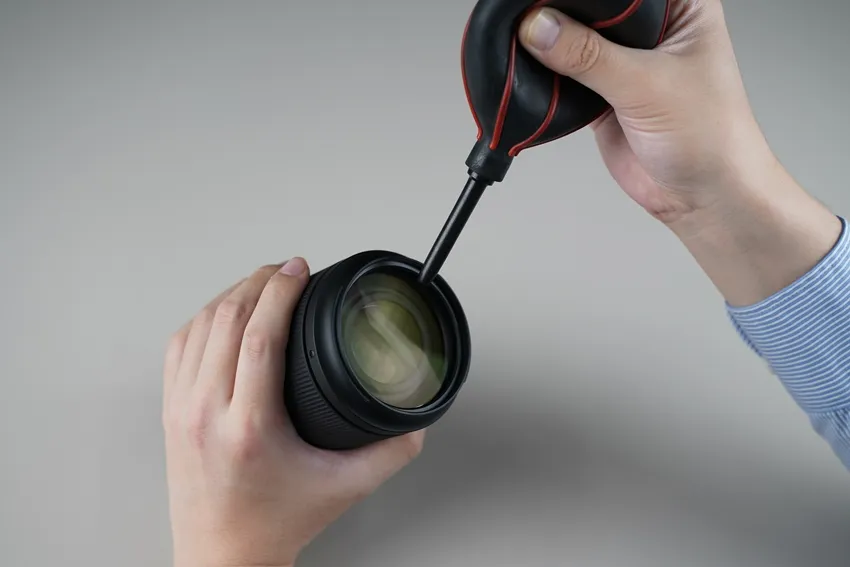
Use the blower to remove loose dust and particles.
Hold the lens so that loose particles can fall away from the surface rather than simply moving around it.
Do not touch the glass with the blower tip.
This step is important because wiping a dusty surface can drag particles across the lens.
If you’re cleaning equipment after photographing at a beach or dusty location, spend extra time removing sand and particles from around the lens barrel, zoom ring, focus ring, and mount.
Step 2: Clean the Front Element
Once loose particles have been removed, inspect the front element.
If you see fingerprints or other marks, apply a small amount of appropriate lens cleaning solution to lens cleaning paper or a suitable cleaning cloth.
Do not pour or spray cleaning solution directly onto the lens.
Gently wipe from the center of the lens outward using a controlled circular motion.
Don’t press hard.
The goal is to remove the contamination with minimal pressure.
TAMRON recommends gentle cleaning because excessive force can potentially damage the lens surface or coating.
What About Fluorine-Coated Lenses?
Some lenses feature a fluorine coating that helps repel water and oil.
For lenses with a fluorine coating, follow the manufacturer’s specific cleaning instructions.
TAMRON’s maintenance guidance advises using a dry microfiber cloth rather than lens cleaner on lenses with a fluorine coating.
When in doubt, check the documentation for your specific lens.
Step 3: Clean the Rear Element
The rear element also needs attention.
This part of the lens can accumulate dust and fingerprints, particularly around the mount.
Use the same basic approach:
- Remove loose particles with a blower.
- Inspect the surface.
- Clean gently if necessary.
- Avoid touching electrical contacts.
The lens mount and electronic contacts deserve special attention.
When changing lenses, avoid touching the contacts with your fingers.
Skin oils and moisture can transfer to these areas.
Step 4: Clean the Lens Barrel
The lens barrel doesn’t need the same treatment as the optical elements.
Start by using a blower around areas where dust can accumulate, such as:
- Zoom rings
- Focus rings
- Switches
- Seams
- Mount areas
- Other grooves
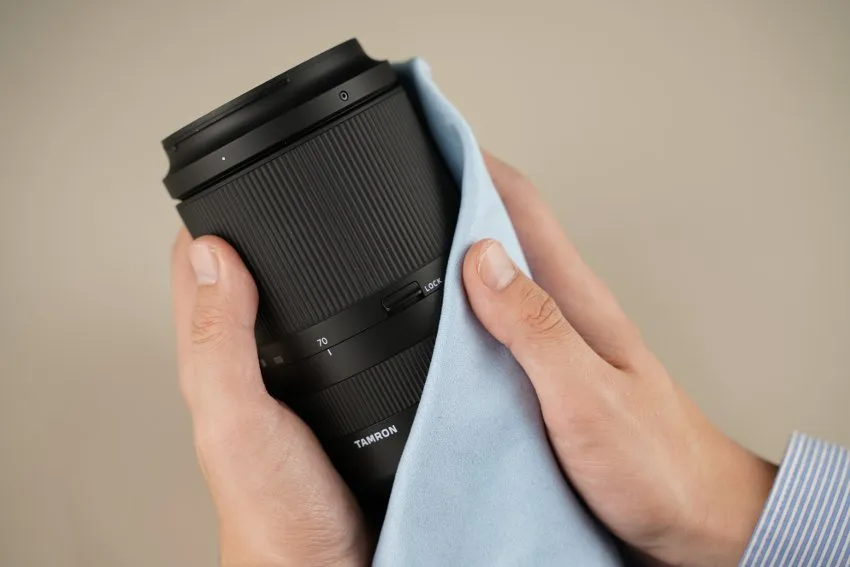
Then use a clean, dry microfiber cloth to wipe the exterior.
Avoid applying lens cleaning solution to the lens barrel unless the manufacturer’s instructions specifically recommend it.
Don’t scrub aggressively.
Some exterior surfaces can be scratched by excessive friction or by particles trapped in the cloth.
For lenses whose barrel extends while zooming, extend the lens appropriately and gently clean the exposed areas.
How Often Should You Clean a Camera Lens?
There is no need to perform a full wet-cleaning procedure every time you use your camera.
In fact, unnecessary cleaning can expose the lens to unnecessary handling.
Instead, inspect the lens regularly.
A deeper cleaning may be appropriate when:
- You see fingerprints
- Water droplets have reached the lens
- You photographed near the ocean
- You photographed on a sandy beach
- You photographed in dusty conditions
- You were shooting in strong wind
- Pollen or other particles accumulated on the equipment
For general maintenance, TAMRON’s guidance indicates that cleaning every two to three months can be sufficient when there is no obvious contamination, with more immediate cleaning when visible dirt or fingerprints are present.
If the lens looks clean, you don’t necessarily need to use cleaning fluid.
A clean, dry cloth may be all that is required for routine exterior maintenance.
How to Store Camera Lenses Properly
Cleaning is only one part of lens care.
Storage is equally important.
A lens that has been perfectly cleaned can still develop problems if it is stored in an unsuitable environment.
Avoid Excessive Humidity
Humidity is particularly important for photographers in tropical climates.
Long-term exposure to excessive humidity can increase the risk of mold and mildew.
TAMRON recommends a humidity range of approximately 40–50% for lens storage.
A hygrometer can help you monitor the humidity in your storage area.
Don’t simply add large amounts of desiccant and assume that drier is always better.
Extremely low humidity isn’t the goal.
The objective is a controlled environment.
Use a Dry Cabinet When Possible
A moisture-controlled cabinet can make lens storage easier.
A dry cabinet allows you to monitor and control humidity rather than relying on guesswork.
If you use one:
- Keep humidity at an appropriate level.
- Store lenses with front and rear caps attached.
- Remove filters when appropriate.
- Avoid storing lenses attached to the camera body for long-term storage.
- Check your equipment periodically.
A dry cabinet is particularly useful for photographers who own multiple lenses or frequently work in humid environments.
What If You Don’t Have a Dry Cabinet?
A dry cabinet isn’t the only way to store camera equipment.
A sealed dry box with an appropriate desiccant and hygrometer can provide another option.
The important part is controlling the environment.
Don’t simply place a large amount of silica gel next to your equipment without monitoring humidity.
Desiccants have a useful role, but they need to be used appropriately.
Also pay attention to their condition and replacement requirements.
TAMRON advises monitoring humidity and replacing desiccants as necessary rather than allowing them to remain indefinitely.
Don’t Store Your Lens in Direct Sunlight
Avoid storing lenses where they are exposed to direct sunlight for extended periods.
A cool, dry, and well-ventilated storage environment is preferable.
Also avoid placing equipment directly in the path of strong air-conditioning airflow.
Rapid temperature changes can contribute to condensation.
Instead, aim for a stable environment.
Remove the Lens From the Camera for Long-Term Storage
When storing equipment for an extended period, TAMRON recommends removing the lens from the camera body and storing it with the appropriate lens caps.
This also gives you an opportunity to inspect the mount and contacts.
Store the lens with the front and rear caps attached.
This helps keep dust from entering the optical system.
Operate Stored Lenses Periodically
A lens shouldn’t simply be forgotten in a cabinet for months or years.
Even when a lens isn’t being used regularly, take it out periodically.
TAMRON recommends attaching stored lenses to a camera, taking test shots, and operating the zoom and focus rings periodically.
This provides an opportunity to:
- Check autofocus
- Check zoom operation
- Check focus operation
- Inspect the exterior
- Look for dust or moisture
- Confirm that the lens is functioning normally
If you notice unusual resistance, noise, or other changes in operation, consider having the lens inspected by an authorized service center.
How to Prevent Condensation on Camera Lenses
Condensation is one of the most important problems to understand when caring for camera equipment.
It occurs when a lens experiences a rapid temperature change.
For example, imagine photographing outdoors in a cold environment and then entering a warm room.
The temperature difference can cause moisture to form on the lens.
Condensation can occur on the outside of the lens and, under certain conditions, inside the lens.
TAMRON explains that condensation can contribute to water stains and eventually create conditions where mildew can develop.
How to Prevent Condensation When Moving Between Temperatures
One of the simplest ways to reduce condensation risk is to allow your equipment to acclimate gradually.
If you are moving from a cold environment into a warm room, don’t immediately remove the camera and lens from their case.
Instead:
- Keep the equipment inside the case or pouch.
- Allow it to gradually reach the surrounding temperature.
- Wait before opening the case.
- Once the equipment has acclimated, inspect and clean it if necessary.
This reduces the sudden temperature change around the equipment.
The same principle applies when moving between significantly different environments.
Why Is Mold Dangerous for Camera Lenses?
Mold can develop when moisture and other favorable conditions persist inside or around optical equipment.
Once mold has developed inside a lens, removing the damage can be difficult.
TAMRON notes that water stains cannot necessarily be completely restored to their original condition and that mold prevention is therefore important to lens longevity.
This is why prevention is much better than trying to repair the problem afterward.
Good storage habits can make a significant difference.
Lens Maintenance by Season
Different weather conditions create different challenges for camera equipment.
While the Philippines doesn’t experience the same four-season climate as Japan and other countries, the principles in this section can be applied according to your local shooting conditions.
Spring: Protect Against Pollen and Dust
In areas experiencing spring conditions, pollen and fine dust can become significant problems.
Strong winds can carry these particles onto your equipment.
Keep the lens cap attached whenever the camera isn’t being used.
After shooting outdoors, inspect the lens and camera body.
Use a blower to remove loose particles.
This is especially important when photographing in fields, parks, forests, or other areas with vegetation and pollen.
For photographers in the Philippines, similar care is useful during dry and windy conditions when dust and fine particles are more likely to accumulate.
Rainy Season and Humid Conditions
Humid conditions require additional attention.
The Philippines’ rainy season can expose equipment to:
- High humidity
- Rain
- Water droplets
- Wet vegetation
- Mud
- Condensation when moving between environments
Don’t immediately store wet equipment in a sealed container.
First, remove visible moisture and allow the equipment to dry appropriately.
Then store it in a controlled environment.
If your equipment has been exposed to significant rain or moisture, inspect it carefully before long-term storage.
Summer and Hot Weather
Hot conditions can create another set of challenges.
Avoid leaving your camera and lenses inside a vehicle under direct sunlight.
Extreme heat can be harmful to photographic equipment.
When moving from a very hot outdoor environment into a strongly air-conditioned room, be aware of the possibility of condensation caused by a rapid temperature change.
Allow the equipment to acclimate gradually.
Winter and Cold Weather
In colder regions, temperature differences between outdoor and indoor environments can create condensation.
If you’re returning from a cold outdoor shoot into a warm room, keep your equipment inside its case or pouch until it has had time to acclimate.
This is particularly important when photographing in:
- Snow
- Mountains
- Ski resorts
- Cold forests
- Other low-temperature environments
TAMRON specifically recommends allowing equipment to acclimate before removing it from its case when returning from cold environments.
Camera Lens Care at the Beach
Beaches are beautiful locations for photography, but they can be challenging environments for lenses.
There are two major concerns:
Sand and saltwater.
Fine sand can enter grooves and moving parts.
Saltwater can leave deposits and potentially damage equipment if it remains on the surface.
Avoid Changing Lenses Unnecessarily
When photographing at the beach, consider using the minimum equipment necessary.
Changing lenses exposes the camera and equipment to the surrounding environment.
If you know what type of photography you’ll be doing, choosing an appropriate lens before heading onto the beach can reduce unnecessary lens changes.
Clean Sand With a Blower First
If sand gets onto your equipment, don’t immediately wipe it away.
Use a blower first.
Pay special attention to:
- Zoom rings
- Focus rings
- Lens mounts
- Seams
- Switches
- Other grooves
Only wipe the equipment once you’re confident that loose particles have been removed.
This reduces the risk of dragging sand across the lens surface.
Take Extra Care Near the Ocean
Seawater contains salt, which can leave residue on equipment.
If water droplets reach your lens or camera, wipe them away carefully as soon as practical.
Don’t allow saltwater to remain on the equipment.
After returning from an ocean shoot, inspect your equipment carefully and clean it according to the manufacturer’s recommendations.
Camera Lens Care Near Water
Rivers, waterfalls, lakes, and other bodies of water can also expose your equipment to moisture.
Even if it isn’t raining, water spray can reach the lens.
A lens hood can provide some protection from stray droplets while also helping reduce unwanted flare.
If water reaches the lens surface, remove it carefully rather than aggressively rubbing the glass.
Always allow equipment to dry properly before long-term storage.
Camera Lens Care in Dusty Locations
Dusty locations can be particularly challenging.
Examples include:
- Beaches
- Deserts
- Construction areas
- Dirt roads
- Playgrounds
- Dry fields
- Gravel paths
When photographing in these environments, minimize lens changes.
Keep the lens cap on when the camera isn’t being used.
After shooting, start with a blower.
TAMRON specifically recommends using a blower to remove dust and dirt after shooting in dusty environments such as sandy beaches and playgrounds.
What Not to Use to Clean Camera Lenses
Knowing what not to do is just as important as knowing how to clean your equipment.
Don’t Use Household Glass Cleaner
Window and household glass cleaners aren’t designed for camera optics.
Avoid using them.
Don’t Use Benzene or Thinner
Organic solvents such as benzene or thinner should never be used for routine lens cleaning.
TAMRON explicitly advises against these substances.
Don’t Use Your Shirt
It may be tempting to wipe the lens with whatever fabric is available.
Avoid doing this.
Clothing can contain dust, dirt, and particles that may scratch the surface.
Use a clean cloth specifically intended for optical equipment.
Don’t Blow on the Lens With Your Mouth
Breathing directly onto the lens can introduce moisture and saliva onto the optical surface.
Use a blower instead.
Don’t Press Hard
Lens coatings are delicate.
Cleaning should be gentle.
If a mark doesn’t disappear immediately, don’t increase pressure aggressively.
Instead, use the appropriate cleaning method and equipment.
When Should You Send Your Lens for Professional Service?
Routine cleaning is something photographers can generally handle themselves.
However, some problems require professional attention.
Consider contacting an authorized service center if you notice:
- Unusual focusing behavior
- Abnormal zoom resistance
- Strange noises
- Moisture inside the lens
- Significant mold
- Persistent optical contamination
- Damage from impact
- Problems with electronic contacts
- Damage that cannot be removed through normal cleaning
Don’t attempt to disassemble the lens yourself.
Modern lenses contain precision optical and electronic components that require specialized tools and knowledge.
Choose a Lens Designed for Outdoor Conditions
Cleaning and storage are important, but lens design can also make a difference when photographing outdoors.
Some TAMRON lenses feature moisture-resistant construction designed to help reduce the risk of water entering the lens under appropriate conditions.
However, moisture resistance does not mean waterproofing.
It is still important to protect your equipment during heavy rain or prolonged exposure to water.
What Is Fluorine Coating?
Some TAMRON lenses feature a fluorine coating on the front element.
Fluorine coatings are designed to repel water and oil, making it more difficult for contaminants such as water droplets and fingerprints to adhere to the surface.
This can make the lens easier to maintain in challenging outdoor environments.
However, fluorine coating does not eliminate the need for proper cleaning.
Follow the manufacturer’s instructions when cleaning a fluorine-coated lens.

Build a Simple Lens Maintenance Routine
You don’t need to spend a lot of time maintaining your lenses.
A simple routine can make a big difference.
Before Shooting
Check:
- Front element
- Rear element
- Lens caps
- Lens barrel
- Zoom ring
- Focus ring
- Mount
- Contacts
Make sure the lens is clean before leaving for your shoot.
During Shooting
Keep the lens cap on whenever you’re not photographing.
Avoid placing the camera on dusty or wet surfaces.
Minimize unnecessary lens changes in dusty, sandy, or wet environments.
After Shooting
Inspect the equipment.
Use a blower to remove loose dust.
Wipe visible moisture or contamination appropriately.
Pay particular attention after shooting near:
- Beaches
- Oceans
- Waterfalls
- Rain
- Dust
- Sand
- Mountains
- High-humidity environments
Before Storage
Make sure the equipment is dry.
Attach the front and rear lens caps.
Store the lens in a controlled environment.
Check your storage humidity.
Avoid direct sunlight and excessive heat.
A Simple Camera Lens Cleaning Checklist
Keep this checklist in your camera bag or workspace:
1. Inspect the lens
Look for dust, fingerprints, moisture, and other contamination.
2. Use a blower
Remove loose particles before touching the lens.
3. Clean the optical surface if necessary
Use appropriate lens cleaning materials and gentle movements.
4. Clean the exterior
Use a clean, dry microfiber cloth on the lens barrel.
5. Check the mount
Remove dust and avoid touching electronic contacts.
6. Dry the equipment
Make sure moisture has been removed before storage.
7. Store properly
Keep lenses in a controlled environment with appropriate humidity.
8. Check periodically
Even unused lenses should be inspected and operated from time to time.
Final Tips for Camera Lens Care
Taking care of your camera lenses doesn’t require complicated equipment or constant cleaning.
The most important thing is consistency.
Use a blower before wiping the lens.
Use cleaning materials specifically designed for camera equipment.
Never use household solvents or aggressive cleaning methods.
Keep your microfiber cloths clean.
Pay particular attention to your equipment after photographing in environments with sand, dust, seawater, rain, or high humidity.
Storage is equally important.
Keep lenses in an environment with controlled humidity, ideally around 40–50%, and avoid excessive heat, moisture, and direct sunlight.
Be especially careful when moving equipment between environments with large temperature differences.
Allow your camera and lens to acclimate gradually inside their case or pouch to reduce the risk of condensation.
If you live in a humid climate, such as the Philippines, maintaining a controlled storage environment is particularly important.
A dry cabinet or properly managed dry box can make long-term storage much easier.
Finally, know when to stop cleaning and seek professional help.
If you see mold inside the lens, experience abnormal operation, or suspect internal moisture or damage, don’t attempt to disassemble the lens yourself.
Proper camera lens cleaning and maintenance is ultimately about prevention.
By developing good habits before, during, and after every shoot, you can help keep your lenses clean, functional, and ready for the next photographic opportunity.